

SDK v7.x · Last verified March 2026 · iOS · Android · Web · Flutter
Speed run — just the code
Speed run — just the code
Prerequisites: SDK installed and authenticated → SDK Setup. Shareable links must be configured in Admin Console → Settings → Shareable Links (custom domain is optional).
After completing this guide you’ll have:
- Shareable URLs generated for posts, communities, and user profiles
- Deep link routing that opens your app directly to the target content
- Share sheet integration for native OS sharing on iOS, Android, and Web
Quick Start: Generate a Shareable Link
TypeScript
Shareable links are for sharing outside the app. They produce a URL a user can send to WhatsApp, SMS, or social media that deep-links back into your app. social.plus does not have an in-app repost or reshare API — there is no way to reshare a post into another feed from the SDK.
Step-by-Step Implementation
1
Get the shareable link configuration
The SDK fetches your configured domain and URL patterns from the server. Call this once and cache the result — it rarely changes.Full reference → Content Sharing
TypeScript
2
Generate links for different content types
Use Full reference → Content Sharing
generateLink with the content type and reference ID. It returns null when that content type has no configured pattern, so gate on isEnabled if you need to hide the share action.TypeScript
3
Wire up the native share sheet
Pass the generated URL to the platform’s native share API. On web, use the Web Share API with a clipboard fallback.
TypeScript
4
Handle incoming deep links
When your app opens from a shared link, parse the URL and navigate to the right screen. Match against the same patterns from the configuration.
TypeScript
5
Configure shareable links in the Admin Console
Set up your custom domain and URL patterns in Admin Console → Settings → Shareable Links:
- Domain: Your app’s domain (e.g.,
https://your-app.com) - Post pattern:
/posts/{postId} - Community pattern:
/communities/{communityId} - User pattern:
/users/{userId}
getShareableLinkConfiguration().Connect to Moderation & Analytics
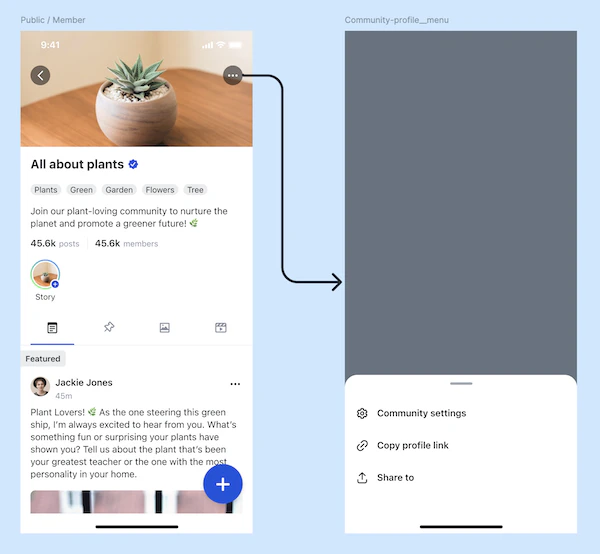
UIKit — Shareable link configuration with customizable URL patterns
Private content protection
Private content protection
Links to private community content should only work for authenticated users who are members. Visitors landing on a private community link should see a “Request to join” prompt, not the content.
Flagged content links
Flagged content links
If a shared post is later removed by moderators, the link should show a “Content unavailable” message rather than a 404. Handle this gracefully in your deep link handler.
Common Mistakes
Best Practices
Growth optimization
Growth optimization
- Add Open Graph meta tags to your web fallback pages so shared links show rich previews on social media
- Use UTM parameters on share links to track which channels drive the most installs
- Cache
getShareableLinkConfiguration()at app startup — it only needs to refresh once per session
Deep link reliability
Deep link reliability
- Always implement a web fallback for users who don’t have the app installed
- Handle edge cases: deleted content, private content the user can’t access, expired links
- Test deep links on both iOS Universal Links and Android App Links — each platform has different setup requirements
- Log failed deep link navigations to catch broken patterns early
User experience
User experience
- Pre-compose the share text with the post’s first 50 characters + the link
- Show a “Copied!” toast when the clipboard fallback fires
- On mobile, use the native share sheet (iOS
UIActivityViewController, AndroidIntent.createChooser) for the best experience
Next Steps
Your next step → Post Impressions & Creator Analytics
Content is shareable — now track who’s viewing it with impression analytics and reach metrics.
User Onboarding & Visitor Mode
Handle visitors who arrive via shared links
Build a Social Feed
Build the feed that shared links navigate to
Community Platform
Create the communities that users share